

Bloombot home
Add to Discord

How Bloombot uses intents

How Bloombot uses the Message Content and Server Members intents, with screenshots

On this page

Message Content intent

A server admin picks one channel as the Global Trade Ad Channel. Members post a trade ad there as a normal message, with text and one image. Bloombot reads only that channel. It checks the text (7 to 200 characters, no external links, a filter for disallowed words) and the image, then posts the ad to the trade ad channels of every server using Bloombot and to the trade board. Messages in any other channel, and messages from bots or webhooks, are ignored.
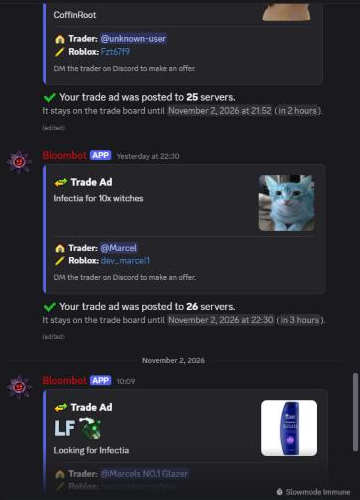
Trade ads Bloombot created from messages in the global trade ads channel

Members' messages in #global-trade-ads, turned into trade ads and posted to 25 to 26 servers. Each ad expires after 24 hours.
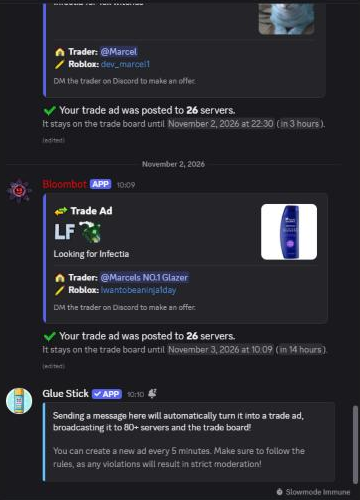
The global trade ads channel with its pinned explanation

The channel explains to members that a message posted there becomes a trade ad.
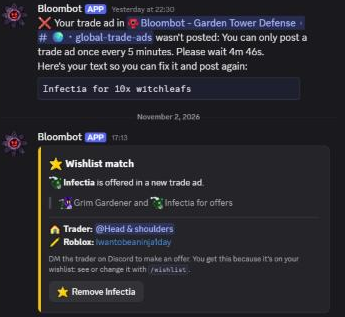
Bloombot DMs a member that their trade ad was not posted, and a wishlist match

When a message breaks the rules (here, posting again within 5 minutes), Bloombot DMs the member the reason and gives their text back. Other members get a DM when an ad offers an item on their wishlist.
Server Members intent

Bloombot uses this intent for invite tracking. When a member joins a server, it records which invite they used and who created it, so it can count how many people each member has invited (invites_required). When a member leaves, they no longer count toward the inviter's total. Staff tools (support lookups and reports) also look members up by ID or username and check their roles.

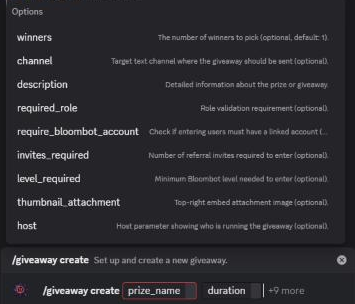
Invite tracking: the invites_required option

Invite tracking: the invites_required option counts the members someone has invited.

Command list

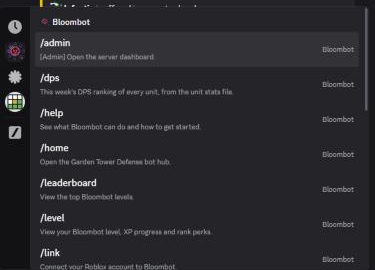
Bloombot slash commands, part 1
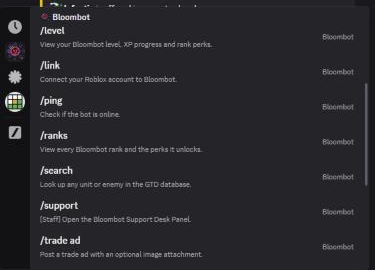
Bloombot slash commands, part 2
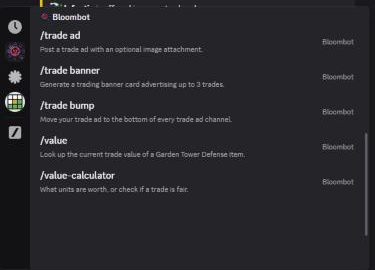
Bloombot slash commands, part 3